Catalog & BOMs
The Catalog area centralizes product setup, cost rollups, and pricing guidance. All recipe functionality is built on Bills of Materials (BOMs) with simple versioning.
Navigating to the Editor
- Go to Manage → Catalog → Products.
- Select any product. The Details tab shows pricing guidance; the Recipe tab opens the BOM editor.
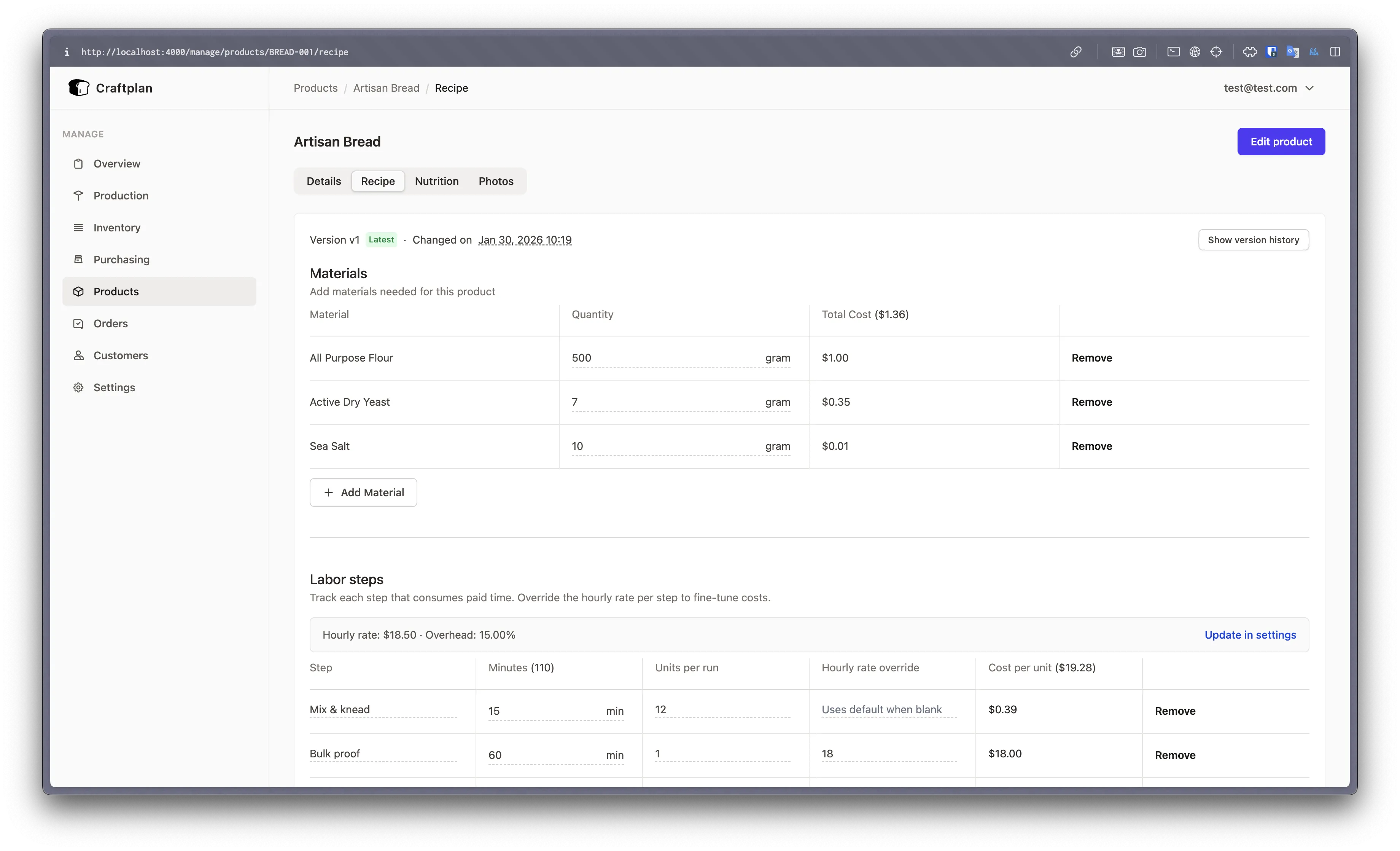
BOM Versioning
Craftplan uses a simple versioning model:
- The header shows the current
vNwith a “Latest” chip. Older versions display a gold banner with a Go to latest shortcut and switch all inputs to read-only. - Show version history opens a modal listing each version, its status, published timestamp, and unit cost from the cached rollup. Use View to jump to a specific version.
- Saving always creates a new active BOM (with
published_atset to now) and archives the previous active version automatically. - The editor supports
?v=NUMBERin the URL for deep-linking to a specific historical version.
Materials, Sub-assemblies & Totals
- Each row in the materials grid links back to the inventory SKU and shows per-row totals using the material’s buy price.
- Add Material picks from stocked materials. Add Sub-assembly pulls another product’s BOM into the current one. Items already added are hidden from the picker to prevent duplicates.
- The table header displays running totals (
Total Cost) so you always see the material spend per product run.
Labor Steps & Scaling
- The Labor steps card shows the configured hourly rate and overhead from Manage → Settings → General with a direct “Update in settings” link.
- Each step captures a name, duration (minutes),
units_per_run, and an optional rate override.units_per_rundefaults to 1. If a mixing step produces four trays at once, set it to 4 so minutes are divided by four when calculating per-unit cost.- Rate overrides accept decimals for differentiating specialized labor (e.g., decorate vs. prep).
- Steps cannot be blank and
units_per_runmust be at least 1.
- The right column shows per-unit labor cost per step. The header displays accumulated minutes and the per-unit total. Overhead percentages are applied later via the rollup.
Notes & Saving
- Process notes live in the “General notes” textarea beneath the labor grid, persisted alongside the BOM version.
- The Save Recipe button is only available on the latest version and disables itself unless there are changes and the form is valid.
Pricing Guidance & Cost Rollups
- The Details tab includes a Suggested Prices card with retail and wholesale recommendations. These use the current BOM unit cost and the markup mode/value pairs configured in settings (percent or fixed).
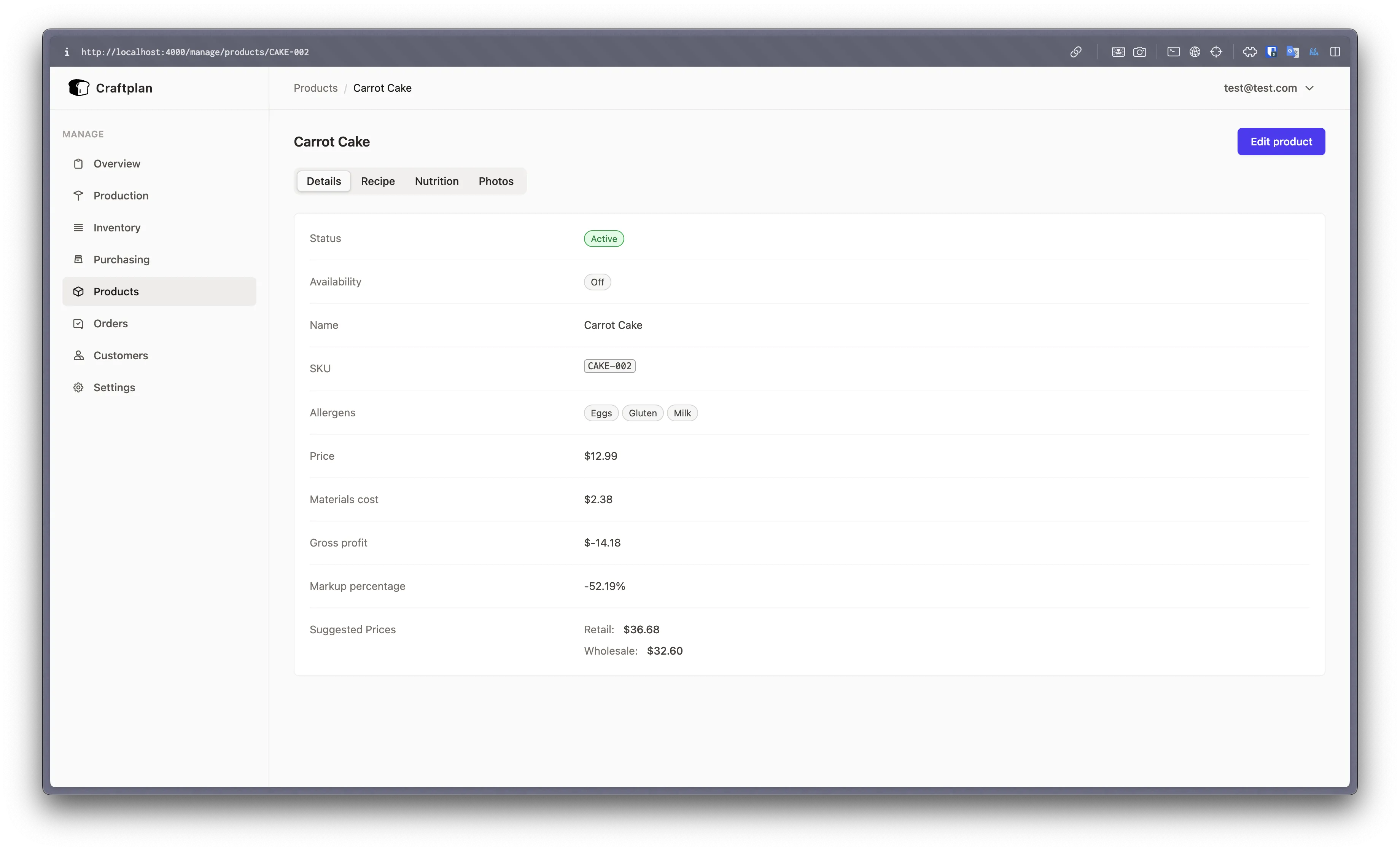
- Materials, labor, and overhead costs are persisted in
catalog_bom_rollups. The planner, invoices, and insights features read from the rollup, so keeping BOMs current is important. - Batch completions copy the BOM costs onto each finished order item. These power the Completion Snapshot in the planner and future COGS reports.